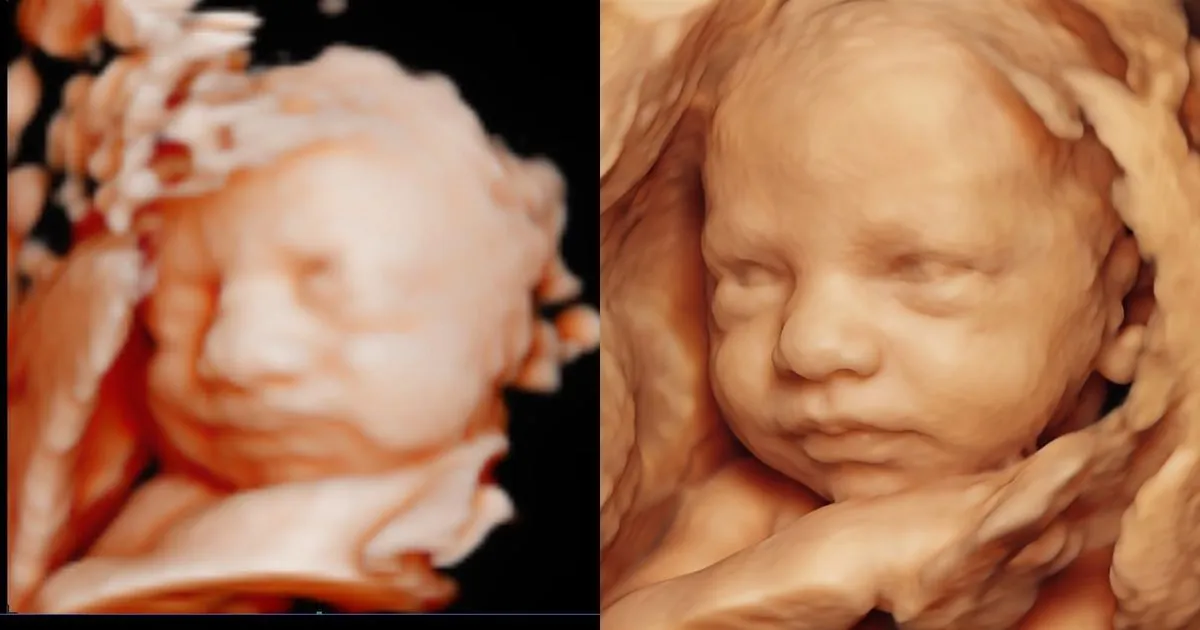
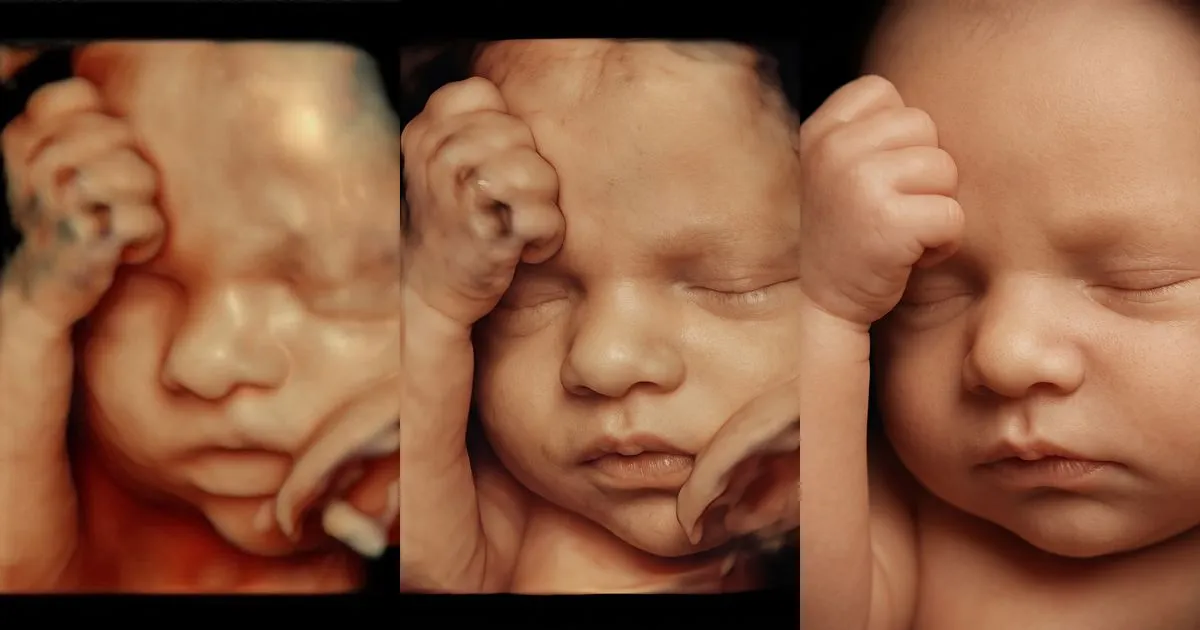
Many parents leave a 4D or 5D session with the same question: “what will our baby really look like?”. Until recently, the only answer was to wait for the birth. Now there are tools that turn a 3D image into a lifelike portrait of the baby in under a minute, and some clinics and studios already sell it as an add-on. This guide explains what it is, what it costs, what to charge and how to fit it into your sessions without adding scan time.
What a hyperrealistic portrait is (and what it isn’t)
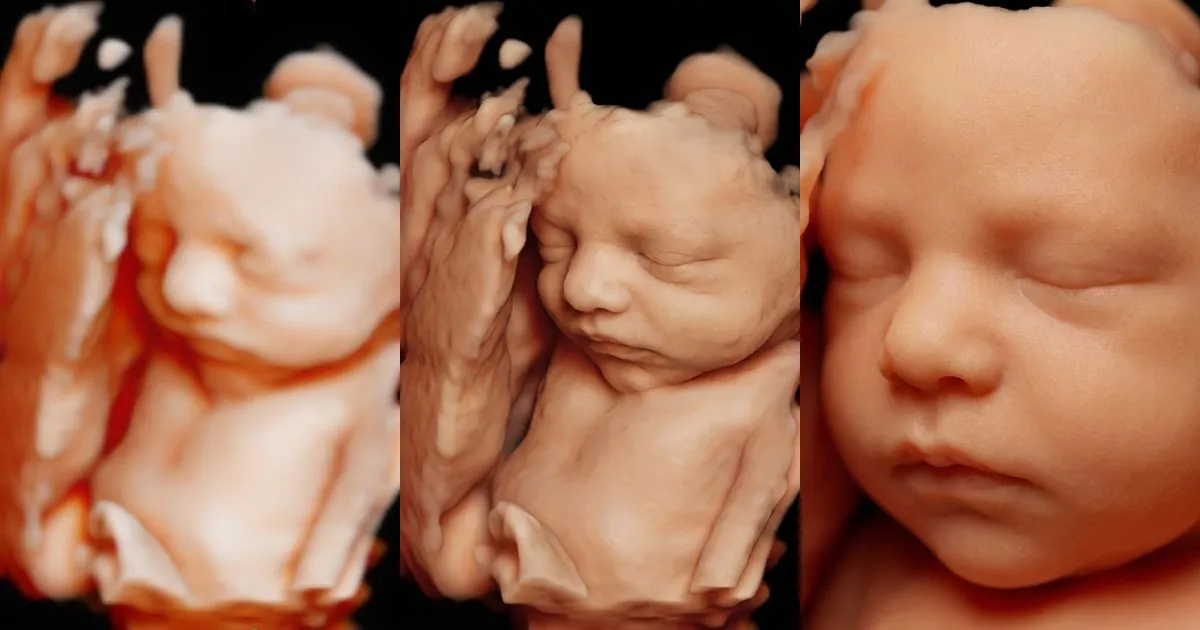
It is an image created from a 3D, 4D or 5D ultrasound you have already captured: it keeps the position of the face, the expression and the visible features, and gives them a photographic finish. There is no need to touch the machine or rescan: the work is done on the image file.
- It is a keepsake, not a medical test. It can’t be used for diagnosis and it doesn’t predict exactly what the baby will look like at birth.
- It adds no scan time. It is made from an image you already have, so it doesn’t extend the baby’s exposure to ultrasound.
- It works with imperfect images. A hand in front of the face or a slightly blurry image won’t stop it, although results improve the more of the face is visible.
This isn’t a passing fad. GE HealthCare, the maker of Voluson ultrasound systems, offers clinics a tool (Natural Portrait View) that turns 3D images into photorealistic portraits and presents it as a keepsake for patients and an extra source of revenue for the practice. In Orlando, MacroBaby lists an “8K Realistic View” among the add-ons for its 4D ultrasound packages, as its blog explained in July 2026.
What it costs and what to charge
The math is simple: what each portrait costs you versus what you charge parents.
| Reference | Amount | Source |
|---|---|---|
| Cost per portrait in the BabyFaceReveal clinic portal | $4.40 to $5.49 per use (each use gives two versions) | BabyFaceReveal pricing, October 2026 |
| Same type of add-on at other studios | Listed as an add-on to 4D packages (8K Realistic View) | MacroBaby blog, July 2026 |
| Suggested stand-alone add-on price | $20 to $35 | Our recommendation |
An example with round numbers: if you do 60 elective sessions a month and one in five families adds the portrait at $25, that is 12 portraits, $300 in revenue and about $66 in cost on the basic plan. That leaves roughly $234 a month in margin from something that takes no room time. With more volume, the 30- and 50-use plans lower the cost per portrait.
When you set the price, think about the total the family pays: a $20 to $35 add-on on top of a typical session is an easy yes in the moment; one that nearly doubles the session isn’t. If you’d rather not sell it on its own, build it into your top package and raise that package just enough that it still feels like the best value.
Work out your margin with your own numbers
Our page for clinics has a calculator with your monthly sessions, the share of parents who choose it and your price. Sign-up includes 2 free uses to try it.
See the calculator and try it free →Three ways to offer it
1. As an add-on at the end of the session
This is the most direct. When the scan is done, pick the best image of the face, upload it and, in under a minute, show the portrait on screen while the parents are still excited. Seeing the result sells it far better than describing it.
2. Included in your premium package
If you sell tiered packages, the portrait gives your top tier something most studios nearby probably don’t offer. It pairs well with prints or video. There are more ideas in how to increase revenue per patient at an ultrasound clinic.
3. As a thank-you gift
Giving it at the last scan of the pregnancy, or to returning families, is an inexpensive way to be remembered. Parents share it with family and on social media, which is free word of mouth for your clinic.
How it fits into your workflow
The workflow in five steps
- During the scan, mark the image where the face is clearest
- Crop or cover the header with the patient’s name before uploading
- Upload it to the portal: you get two versions in under a minute
- Show both on screen and let the parents choose
- Deliver them with the rest of the images, in the same link or message
Delivery matters as much as the portrait: a same-day link with every image is worth far more than a USB drive a week later. We cover it in how to deliver 3D and 4D ultrasound images to parents.
Mistakes to avoid
- Presenting it as a diagnosis or prediction. Say it is an artistic rendering based on their ultrasound. You avoid false expectations and trouble.
- Promising an exact likeness. The portrait respects the visible features, but babies change a lot in the last weeks and at birth.
- Extending the scan to chase the perfect image. There’s no need: any image where the face is visible will do, even if it isn’t perfect.
- Posting it on your clinic’s social media without permission. Get the parents’ consent before using any image as an example.
Sources
- GE HealthCare — Natural Portrait View (accessed October 2026)
- MacroBaby — How much does a 4D ultrasound cost? (July 16, 2026)